

Introduction
Hey, I’m VuongVu, a backend engineer at CyberAgent Hanoi Dev Center. My main team is AI Business Division – where I mostly work on back-end development for app development for retail companies. I want to share how we built a workflow that takes a task ticket and turns it into a production-ready pull request—hitting AI Maturity level of L3 AI Utilization level in the process.
What’s L3 AI Utilization level?
CyberAgent has this maturity model for AI usage, and L3 is “Project Level Generation”—basically going from a ticket to a PR, or a prompt to a UI. That’s what we were aiming for: automate the full development cycle, but keep humans in the loop where it matters.
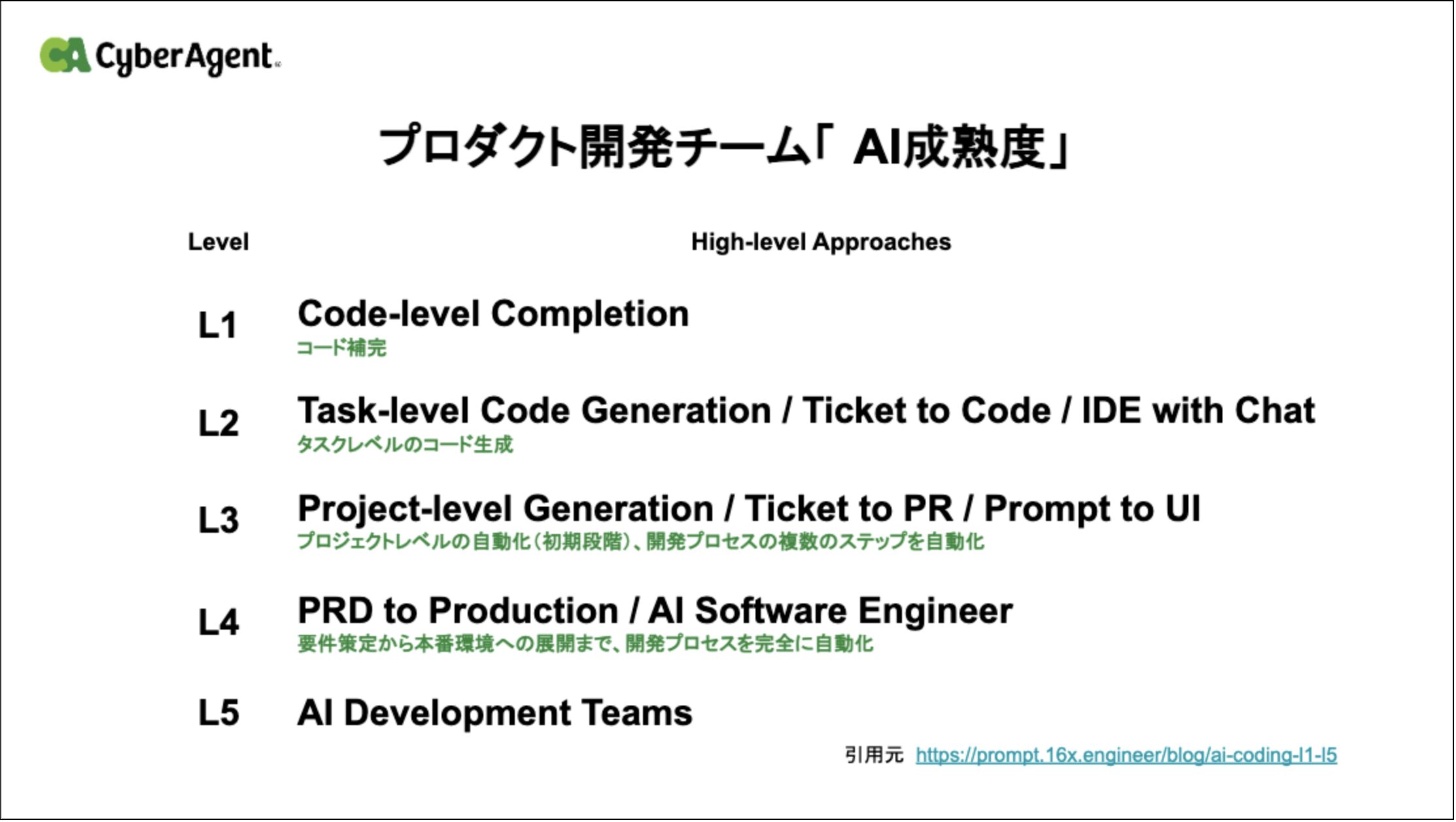
The idea is simple: you start with a task ticket (Linear, Jira, whatever), and the AI handles everything—scope analysis, planning, implementation, review, and PR creation.
The Problem We Were Trying to Solve
As projects grow, developers naturally have to juggle many responsibilities. They need to:
- Understand existing architectural patterns
- Follow coding guidelines
- Write and maintain tests
- Pass lint and CI checks
- Create well-described pull requests
- Address review comments
None of these tasks are particularly difficult on their own. However, when combined, they create significant cognitive load and can slow down development:
- The challenge is cumulative, not individual.
Each step in the development workflow is manageable by itself, but the accumulation of requirements increases friction and reduces development speed. - Best practices are not always obvious.
It’s not easy for everyone—especially newcomers—to understand the best practices at each phase of development. Without clear guidance or support, this can lead to uncertainty, inconsistent quality, and additional review cycles.
We’ve tried the usual fixes—docs, code reviews, automation tools. But they don’t talk to each other. You end up with code that passes tests but ignores established patterns, or PRs that reviewers have to guess the context for.
Why Not Just “Use AI”?
LLMs are now capable of understanding and generating code. However, simply granting an AI access to a codebase is not sufficient for reliable results.
Research shows that model behavior can vary significantly based on small changes in prompt wording, leading to inconsistent outputs even when the intent remains the same (Sclar et al., 2023, Quantifying Language Models’ Sensitivity to Spurious Features in Prompt Design).
At the same time, real-world software engineering benchmarks demonstrate that resolving multi-file, multi-component issues requires more than raw repository access. Without structured workflows, evaluation, and validation loops, models struggle to maintain context and produce correct solutions (Jimenez et al., 2023, SWE-bench: Can Language Models Resolve Real-World GitHub Issues?).
In practice, using LLMs without structure leads to:
- Output variability depending on phrasing
- Loss of context across complex tasks
- Lack of checkpoints for human validation
- Increased token usage and unnecessary costs
These findings suggest that effective AI-assisted development requires structured interaction, evaluation mechanisms, and disciplined workflow design—not just model access.
We built a structured workflow to fix these problems. It takes you from ticket to reviewed draft PR, with human approval at the important decision points.


How the Workflow is Built
Design Principles
Three core principles guided the design of this workflow:
- Automation Requires Architecture: Simply “using AI” or pasting code into a chatbot is insufficient for complex engineering tasks. You need a deliberate system: specialized agents (Orchestrator, Planner, Reviewer), modular Skills, and defined phase transitions. Without this architecture, AI output is unpredictable and hard to trust. The workflow itself is the product—not the model.
- Human Oversight Is Strategic, Not Mechanical: Not every phase needs a human. The workflow automates the tedious parts—parsing tickets, writing boilerplate, running lint, generating PR descriptions—so developers can focus on the decisions that actually matter: approving the implementation plan and reviewing the final PR. This separation is intentional. Humans intervene at high-leverage checkpoints (plan approval, PR review), while AI handles the repetitive execution in between. The result is a workflow that stays autonomous and stable without sacrificing quality or control.
- Consistency Through Structure: A structured workflow ensures that every PR follows the same guidelines, documentation standards, and testing patterns—regardless of which developer initiates it. When phases, templates, and quality gates are built into the system, consistency becomes a property of the process, not a burden on the individual.
The Main Pieces
These principles are realized through the following components:
| Component | What It Does | When It Runs |
|---|---|---|
| Main Orchestrator | Runs the show: input handling, phase transitions, user interaction, and coordination | Always |
| Planning Sub-Agent | Analyzes scope, breaks down into sub-tasks, and writes plans | Spawned for complex analysis |
| Agent Team | Spawns parallel teammates (backend-dev, frontend-dev, native-dev, test-dev) for multi-domain implementation | Large Scope tasks with 2+ affected domains |
| Review Sub-Agent | Reviews code, fixes issues | Spawned for QA |
| Ticket Integration | Pulls task data, updates status | For external service calls |
| Skills | Domain-specific implementation logic: ticket-lifecycle skill feature-implement skill |
Reusable modules |
Architecture Overview
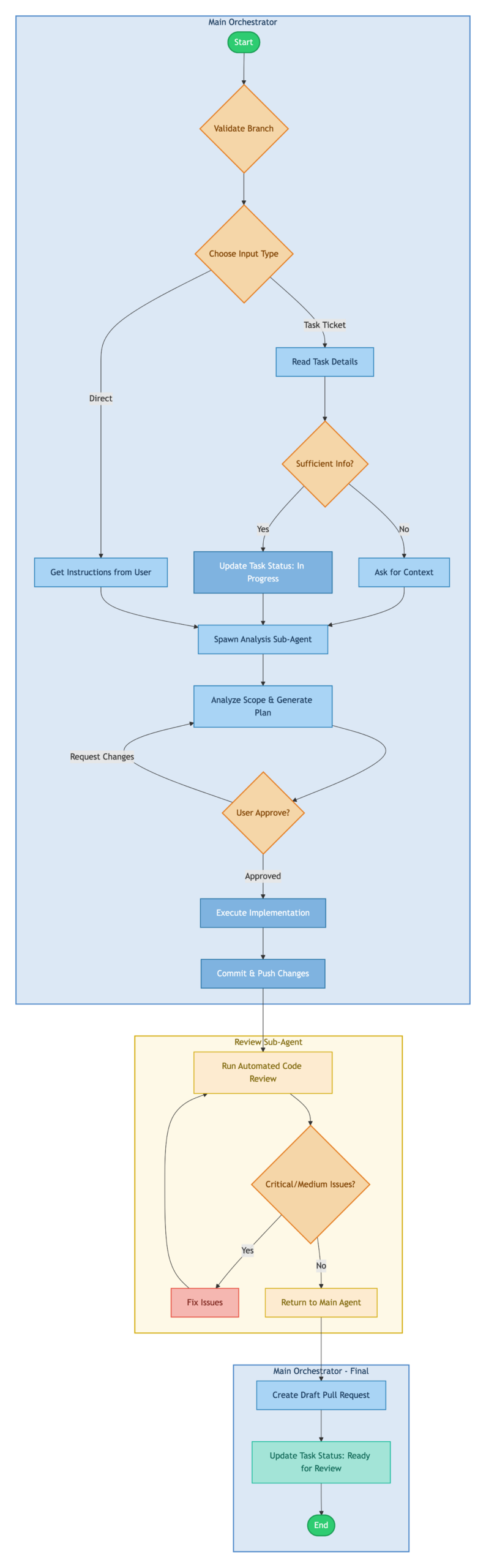
The diagram below illustrates how control flows through the workflow from start to finish. The architecture is divided into three distinct execution contexts, each represented by a colored region:
- Main Orchestrator: The primary execution context that handles user interaction, task input processing, and implementation. This is where most of the work happens, maintaining a single coherent context throughout the session.
- Review Sub-Agent: A specialized agent spawned after implementation to perform automated code review. It runs independently, iterating through fix cycles until code quality meets the threshold. This separation prevents review logic from polluting the implementation context.
- Main Orchestrator – Final: Control returns to the main context for PR creation and status updates, ensuring the user has visibility into the final output.
Skills
Skills are modular, self-contained components, each responsible for a specific capability. This design makes every skill an independent and encapsulated unit.
From my experience, I tried using Pull Request review with the implementation agent. However, since the review agent already has context from the implementation phase, it may introduce bias into the review process, leading to reduced objectivity and less critical feedback.
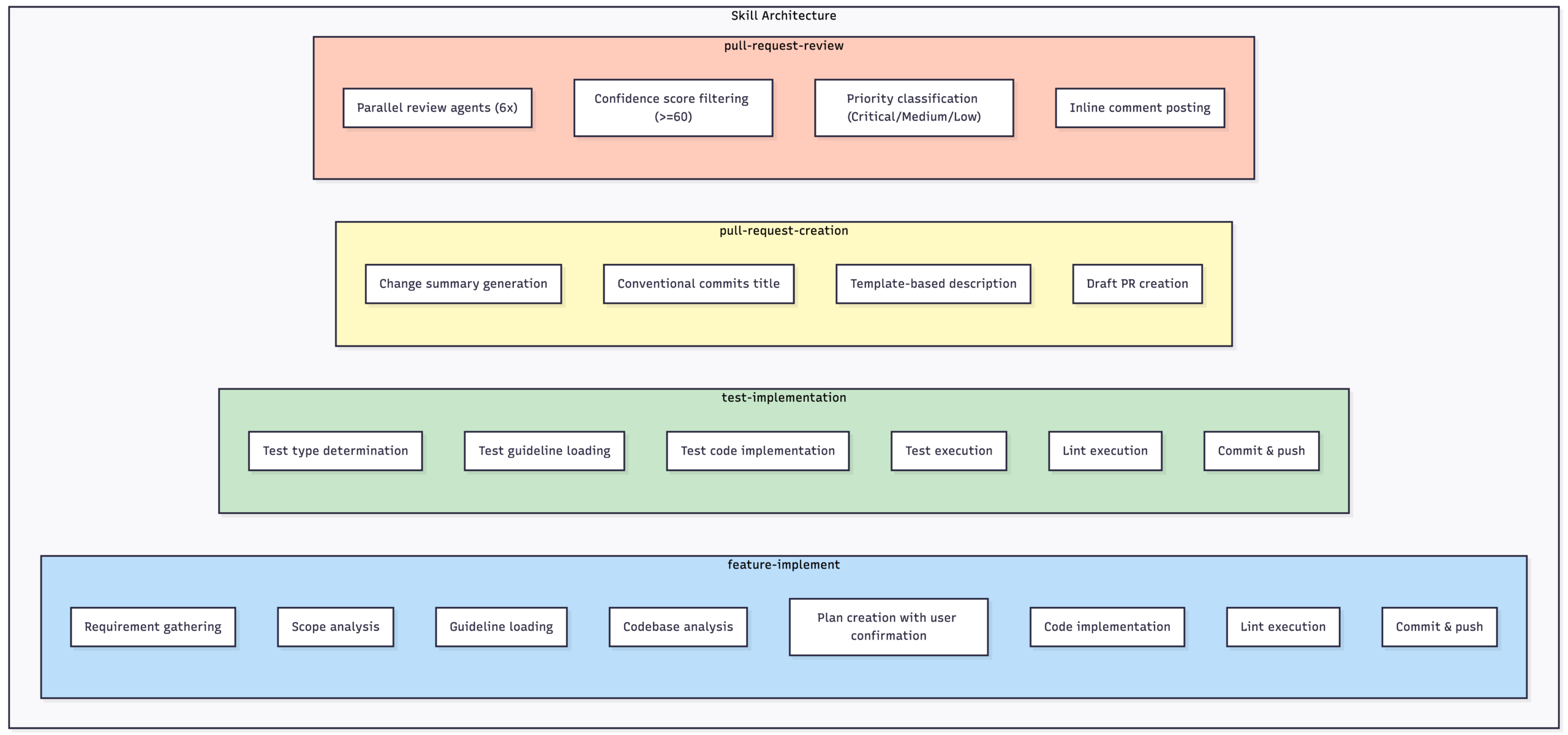
Skill Composition:
A typical feature implementation composes skills sequentially:
scope-analysis → feature-implement → test-implementation → pull-request-review → pull-request-creationHow It Actually Works
Phase 1: Getting the Task
First, we gather info and figure out what kind of task this is.
How ticket should be written:
For the AI agent to work effectively, ticket content needs to be specific and actionable. A well-written ticket should include:
| Element | Description | Example |
|---|---|---|
| Clear Title | A concise summary of what needs to be done | “Add pagination to user list API endpoint” |
| Acceptance Criteria | Testable conditions that define “done” | “API returns 20 items per page with next_cursor field” |
| Context / Background | Why this task exists and what problem it solves | “Current endpoint returns all users at once, causing timeouts for large datasets” |
| Scope Boundaries | What is explicitly in-scope and out-of-scope | “In-scope: backend API changes. Out-of-scope: frontend UI updates” |
| Technical References (optional) | Links to related code, docs, or prior discussions | “See user.go for existing implementation” |
Avoid vague descriptions like “improve the user page” or “fix the bug”—these force the AI to guess, which leads to wasted cycles and wrong implementations.
Example ticket template:
Title: [Action verb] + [specific target] + [context if needed]

## Background
[Why this task exists. Link to related tickets or discussions if applicable.]

## Requirements
- [ ] [Specific, testable requirement 1]
- [ ] [Specific, testable requirement 2]
- [ ] [Specific, testable requirement 3]

## Acceptance Criteria
- [Condition that can be verified by test or review]
- [Condition that can be verified by test or review]

## Scope
- **In-scope**: [What this ticket covers]
- **Out-of-scope**: [What this ticket explicitly does NOT cover]

## Technical Notes (optional)
- Related files: [file paths or module names]
- Dependencies: [other tickets or services this depends on]
- Constraints: [performance requirements, backward compatibility, etc.]
How we route tasks:
| Task Type | How We Detect It Through Prompt | Where It Goes |
|---|---|---|
| Test Implementation | “test”, “E2E”, “unit test” in title, or files matching *_test.* | test-implement skill |
| General Implementation | Everything else (features, bugs, refactoring) | feature-implement skill |
Phase 2: Planning
Once we have the task, a sub-agent figures out the scope and builds a plan.
How we classify scope:
We don’t count files or lines of code. We look at functional requirements:
| Scope | What It Looks Like | Example | How We Handle It |
|---|---|---|---|
| Small-Medium | One requirement, one PR, limited blast radius | Single use case change, one admin screen | Implement directly |
| Large | Multiple requirements, cross-domain, needs staging | API + Backend + Frontend, 3+ domains | Split into subtasks by requirement |
The plan template:
## Implementation Plan

### Scope Classification
[Small-Medium / Large]

### Subtasks (Large Scope only)
1. Subtask 1 description
2. Subtask 2 description

### Implementation Goals
[What we're trying to achieve]

### Implementation Approach
[Technical approach and key decisions]

### Files to Change
| File Path | Change Description | New/Modify |
|-----------|-------------------|------------|
| path/to/file1 | Add X functionality | Modify |
| path/to/file2 | Implement Y | New |

### Implementation Steps
1. [Step 1 details]
2. [Step 2 details]
3. [Step 3 details]

### Risks and Considerations
- [Potential issues and mitigations]
- [Dependencies and impact areas]
Getting approval:
This is important: we don’t start coding until the user says the plan looks good.
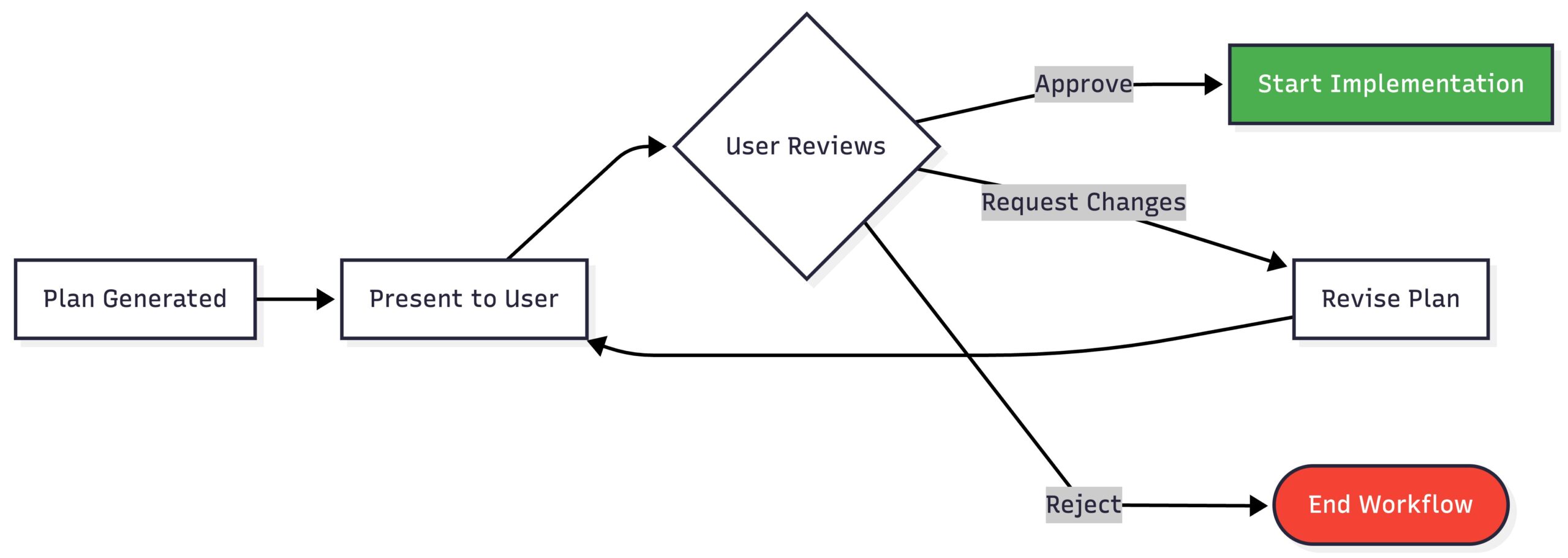
This checkpoint catches misunderstandings before we waste time implementing the wrong thing.
Phase 3: Implementation
Now we actually write code, with quality checks built in:

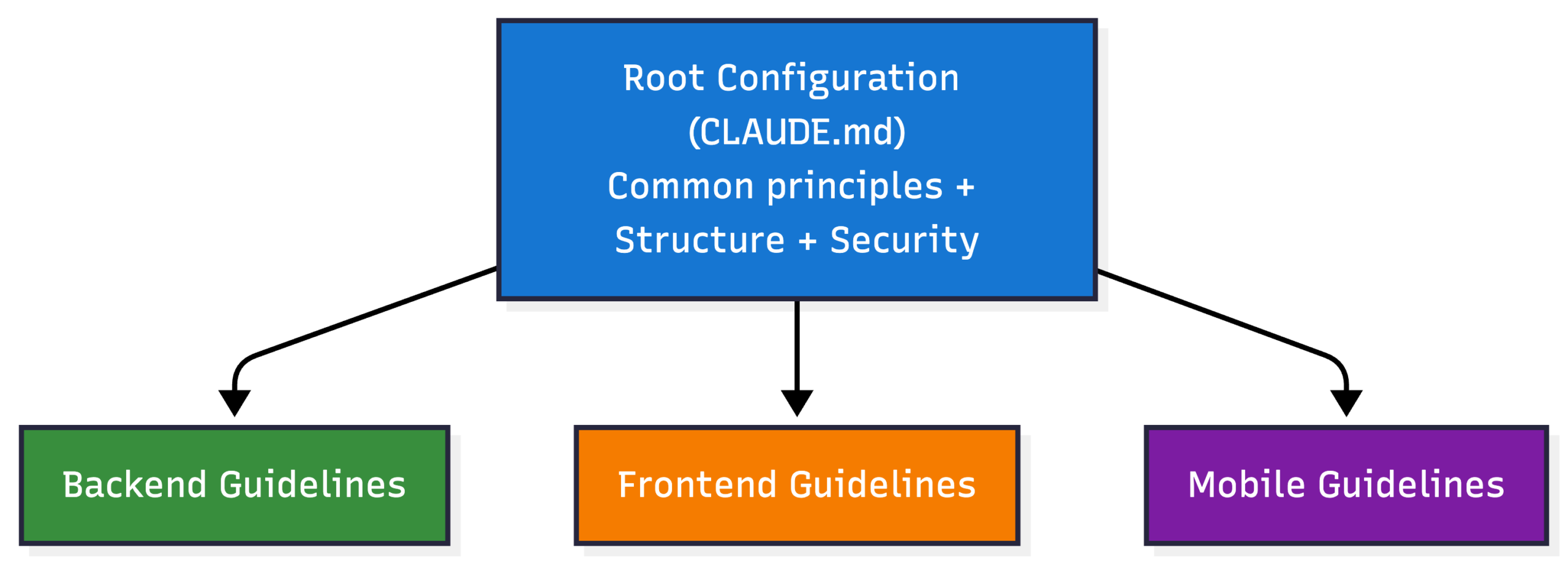
Guidelines:
The workflow loads project-specific guidelines automatically:
Phase 4: Review and Fix Loop
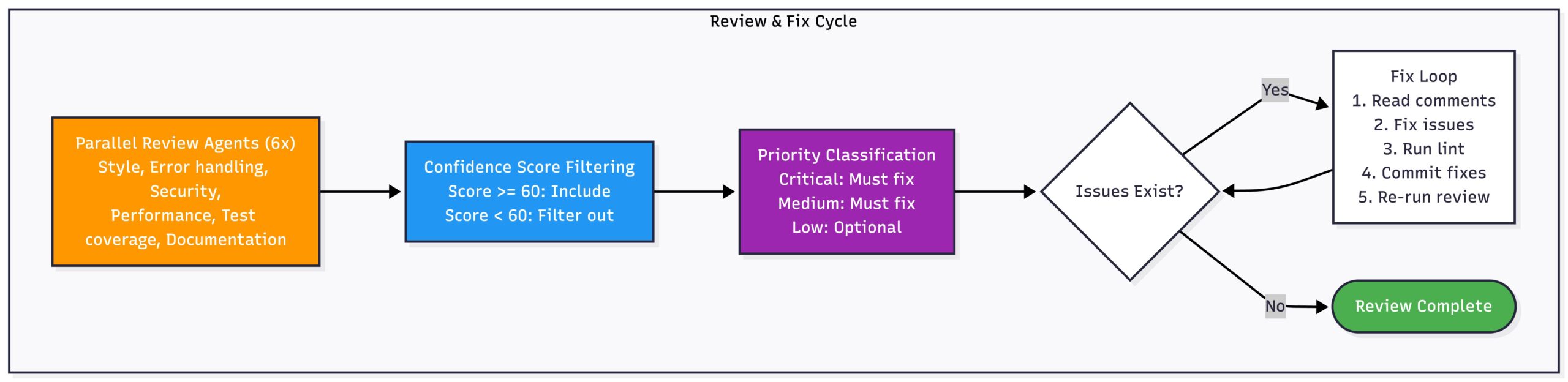
After implementation, a review sub-agent checks the code and fixes what it finds:
Phase 5: Creating the PR
Finally, we create a draft PR with all the documentation:

Metrics (Optional)
The workflow can track what happened:
## Workflow Insights

This PR was created using the automated implementation workflow.

### Session Summary
| Phase | Duration |
|-------|----------|
| Planning | X min |
| Implementation | Y min |
| Review & Fix | Z min |
| **Total** | **N min** |

### User Interventions
- Plan revisions requested: N
- Review fixes applied: M

### Process Notes
- Sub-agents spawned: K
- Task routing: feature-implement / test-implementation
Results from the Proof of Concept
We tested this on two real tasks with different complexity levels.
Case Study 1: E2E Test Implementation
Task: Write E2E tests for an endpoint.
| Metric | Value |
|---|---|
| Lines Added | +146 |
| Lines Deleted | 0 |
| Files Changed | 1 |
| Status | Merged |
What worked well:
- Validation error test cases
- Auth error test cases
- 100% guideline compliance
Notable moments:
- Auto-detected as a test task
- Routed to the test-implementation skill
- Fixed several issues during automated review:
- Error code corrections
- Naming convention fixes
- Fixture loading pattern changes
Case Study 2: Cross-Domain Infrastructure + Backend
Task: Set up an environment for automated E2E testing.
| Metric | Infrastructure PR | Backend PR | Total |
|---|---|---|---|
| Lines Added | +103 | +570 | +673 |
| Lines Deleted | 0 | -18 | -18 |
| Files Changed | 2 | 10 | 12 |
| Status | Merged | Merged | Both Merged |
What we built:
- Terraform infrastructure resources
- Multi-pool verification logic in the backend
- Backward compatibility maintained
Notable moments:
- Classified as Large Scope (cross-domain)
- Split into 2 PRs for cleaner review
Token Usage
E2E Test Implementation
| Metric | Value |
|---|---|
| Input Tokens | 30 |
| Output Tokens | 119 |
| Cache Creation | 122.3K |
| Cache Read | 1.1M |
| Total Tokens | 1.2M |
| Estimated Cost | $1.25 |
Cross-Domain Infrastructure + Backend
Investigation:
| Metric | Value |
|---|---|
| Input Tokens | 5.6K |
| Output Tokens | 536 |
| Cache Creation | 383.1K |
| Cache Read | 3.4M |
| Total Tokens | 3.8M |
| Estimated Cost | $4.09 |
Infrastructure + Backend Implementation:
| Metric | Value |
|---|---|
| Input Tokens | 2.3K |
| Output Tokens | 1.5K |
| Cache Creation | 1.2M |
| Cache Read | 16.3M |
| Total Tokens | 17.5M |
| Estimated Cost | $15.85 |
The cross-domain task cost more because it had an investigation phase and multiple review cycles across two PRs. Token usage scales with complexity—no surprise there.
Ref: Claude Token Pricing
Why This Approach Works
It Scales
Adding new capabilities:
- Skill modules can be added without touching the core workflow
- Each skill handles its own domain logic
- New task types just need a new skill
Handling big tasks:
- Large tasks automatically get split into subtasks
- Subtasks can run sequentially or in parallel.
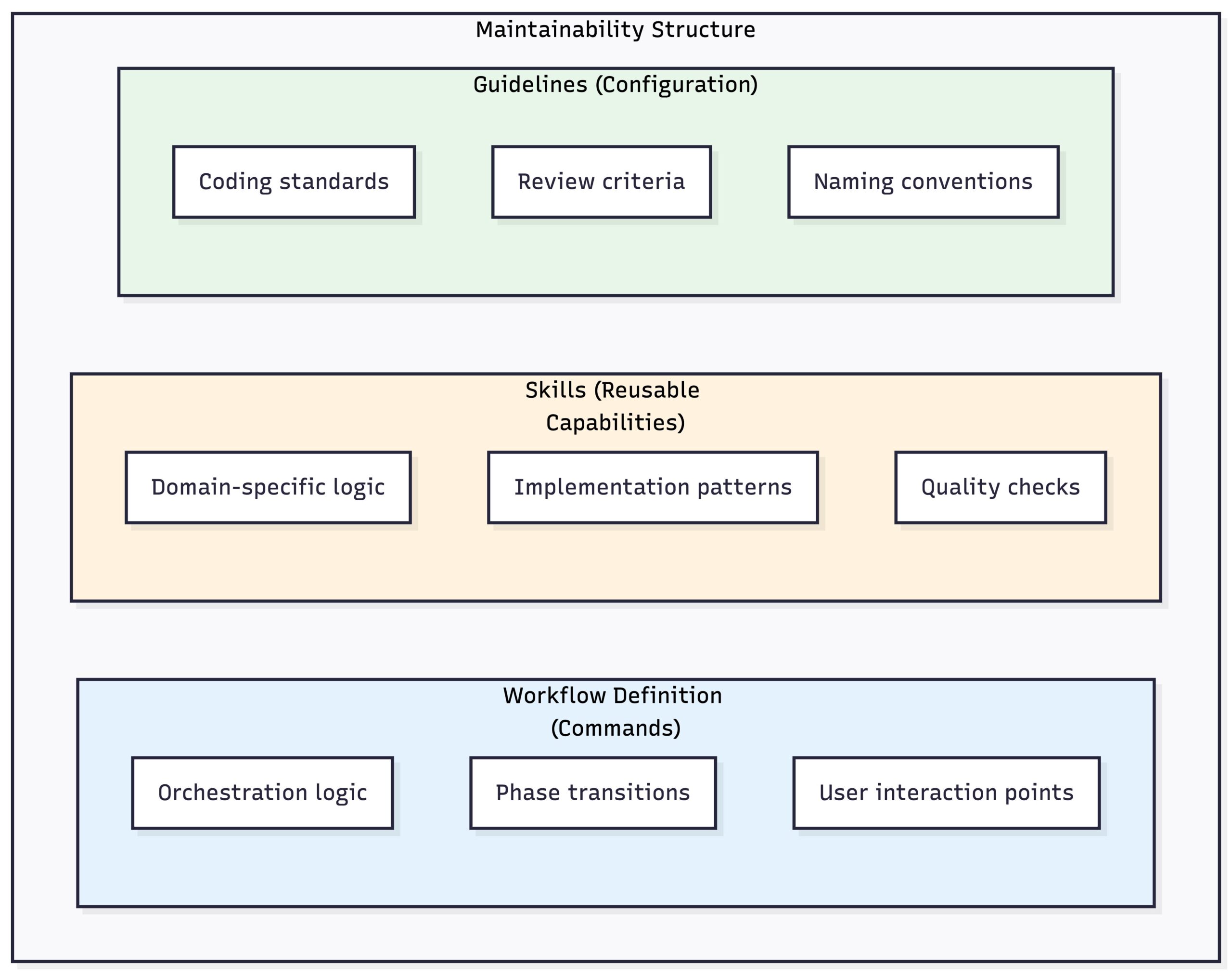
It’s Maintainable
Clear separation:
Change behavior without changing code:
- Update guidelines to change how the AI writes code
- Adjust review criteria without touching the skill
- Document new patterns and they’re immediately applied
Better Developer Experience
| Before | After |
|---|---|
| Read tickets manually | Auto-parsed |
| Plan in your head, notes scattered everywhere | Structured plan, confirmation before coding |
| Wait for human reviewer | Immediate automated pre-review |
| Fill out PR templates by hand | Auto-generated descriptions |
| Switch between tools constantly | Single session |
Consistent Output
Guidelines actually get followed:
- Every implementation loads the relevant guidelines
- Review agents check against documented standards
- Same workflow = same standards across developers
Predictable results:
- Structured phases → predictable artifacts
- Conventional Commits → consistent commit messages
- Templates → documentation that doesn’t vary wildly
What We Learned
The Big Takeaways
- Structure beats ad-hoc prompting. Random AI assistance gives you random results. Phases, checkpoints, and quality gates give you reliable output.
- Keep humans in the loop. Rather than vague oversight, the plan-first approach introduces a clear approval checkpoint. By requiring human validation of the plan before execution, misunderstandings can be identified and corrected early — avoiding the classic “I thought you meant…” scenario.
- Skills are how you grow. Domain logic in reusable modules means you can support new task types without rebuilding everything.
- Automated review catches the easy stuff. Human reviewers don’t have to point out lint failures or naming convention violations. They can focus on the hard problems.
- Cost control needs design. Fewer sub-agents, targeted lint runs, confidence-based filtering—these decisions keep token usage reasonable.
Where Else This Could Work
This pattern fits any dev environment where:
- You have documented guidelines that can be loaded and followed
- Tasks break down into planning, implementation, and review phases
- Quality gates exist (lint, tests, code review) that can be automated
- Human oversight matters at decision points
The point isn’t to replace developers. It’s to automate the boring parts so developers can focus on the interesting problems.
Our Team’s Opportunity
To reach L4/L5, we must shift from “using AI to generate code” to engineering the system around the AI:
- Encode best practices into structured skills
- Define mandatory approval checkpoints
- Automate objective quality gates
- Build evaluation and observability into the workflow
- Treat cost, consistency, and correctness as first-class concerns
If we solve orchestration, structure, and governance — not just model capability — L4 becomes realistic.
If we solve coordination and autonomy at scale, L5 becomes possible.
Wrapping Up
So what is this? It’s a structured workflow that takes a task ticket and turns it into a reviewed, ready-to-merge pull request. The AI handles the mechanical work – reading tickets, analyzing scope, writing code that follows your guidelines, running lint, fixing review comments, and generating PR descriptions. Humans stay in control at the decision points: approving the plan before implementation starts, and doing the final review before merge.
For developers, this means less time on the tedious parts. No more manually parsing ticket details, no more forgetting to run lint, no more writing the same PR description boilerplate. You get a draft PR that’s already passed automated review and follows your team’s patterns.
For teams, it means consistency. Everyone using the workflow produces code that follows the same guidelines, commits in the same format, and PRs with the same level of documentation. New team members can be productive faster because the workflow enforces patterns automatically.
The goal is augmentation, not replacement. Developers still make the architectural decisions, review the final code, and handle the problems that need human judgment. The workflow just takes care of everything else.