

Hi, I’m a backend engineer on the Bucketeer team at CyberAgent Hanoi Dev Center. Bucketeer is our open-source feature flag and A/B testing platform, used by CyberAgent services including AbemaTV for years. In this post I want to share a way to run it on two different platform:
- Fly.io – a PaaS that runs containerized applications on a global network of lightweight VMs.
- AWS Elastic Container Service fargate, a serverless container platform.
What Bucketeer does
Feature flags let you control which users see which version of a feature — without redeploying your application. At their simplest, they’re a conditional: “show feature X to 10% of users.” In practice, they unlock a lot of useful patterns:
- Progressive rollouts — release to 1% of users, watch for errors, then gradually expand to 100%
- A/B testing — split traffic between two variants and measure which performs better, using Bayesian inference
- Kill switches — disable a feature instantly without rolling back a deployment
- Targeted releases — release to internal users, beta testers, or specific segments first
- Auto-ops — automatically roll back or progress a rollout based on custom metrics
Bucketeer supports all of these through a single platform. SDKs are available across various languages and frameworks (iOS, Android, Web Frontend with React, Server with Golang, NodeJS, …); your application calls the SDK to evaluate a flag, and the platform handles targeting, scheduling, and experiment tracking.
The standard deployment and its cost
The standard Bucketeer deployment runs on Google Cloud: GKE for orchestration, Cloud Pub/Sub for the event streaming pipeline between services, and BigQuery as the experiment data warehouse. This is a solid production setup, but it comes with a baseline cost of around 300 USD/month — and that number grows with event volume, since Pub/Sub and BigQuery are both billed per use.
For teams evaluating Bucketeer, or running smaller applications, that entry point is high. It also means you need to be on Google Cloud in the first place.
The lite version
We wanted to make Bucketeer accessible beyond Google Cloud, so we built a lite version designed to run on standard container platforms. The key differences from the standard deployment are:
- The event pipeline uses Redis Streams instead of Cloud Pub/Sub
- The data warehouse supports MySQL or PostgreSQL as alternatives to BigQuery for experiment analytics
With these changes, Bucketeer runs on any platform that can host containers, with no Google Cloud account required.
We put together deployment scripts for two options. All prices in USD/month, assuming 24/7 uptime.
Both deployments run the same services. Nginx routes browser traffic to Web (console and management API) and SDK calls to API (flag evaluation). Subscriber consumes events from Redis Streams and writes results to MySQL. Batch runs scheduled jobs — rollout progression, experiment evaluation, auto-ops — and calls HTTPStan for Bayesian significance calculations. Batch-Cron triggers Batch on a schedule. Migrations run as a one-shot task using Atlas.
The key difference is infrastructure. On Fly.io, each service runs as a Fly Machine — a lightweight VM that starts in milliseconds and is billed only while running. Machines in the same organization share a private WireGuard network, reachable via *.internal DNS, so services talk to each other without any public exposure. The API gets its own anycast IP: when you deploy machines in multiple regions, Fly.io automatically routes each SDK client to the nearest one. Redis is managed by Upstash, with a local socat proxy on each service to handle password authentication. MySQL runs on a Fly Machine with a persistent volume.
On AWS, an Application Load Balancer is the single entry point, forwarding to Nginx. Application services run as ECS Fargate tasks in public subnets — no NAT Gateway needed. Services discover each other via AWS Cloud Map (*.bucketeer.local). MySQL and Redis run on RDS and ElastiCache in private subnets. Secrets are injected from SSM Parameter Store at container startup.
Fly.io architecture
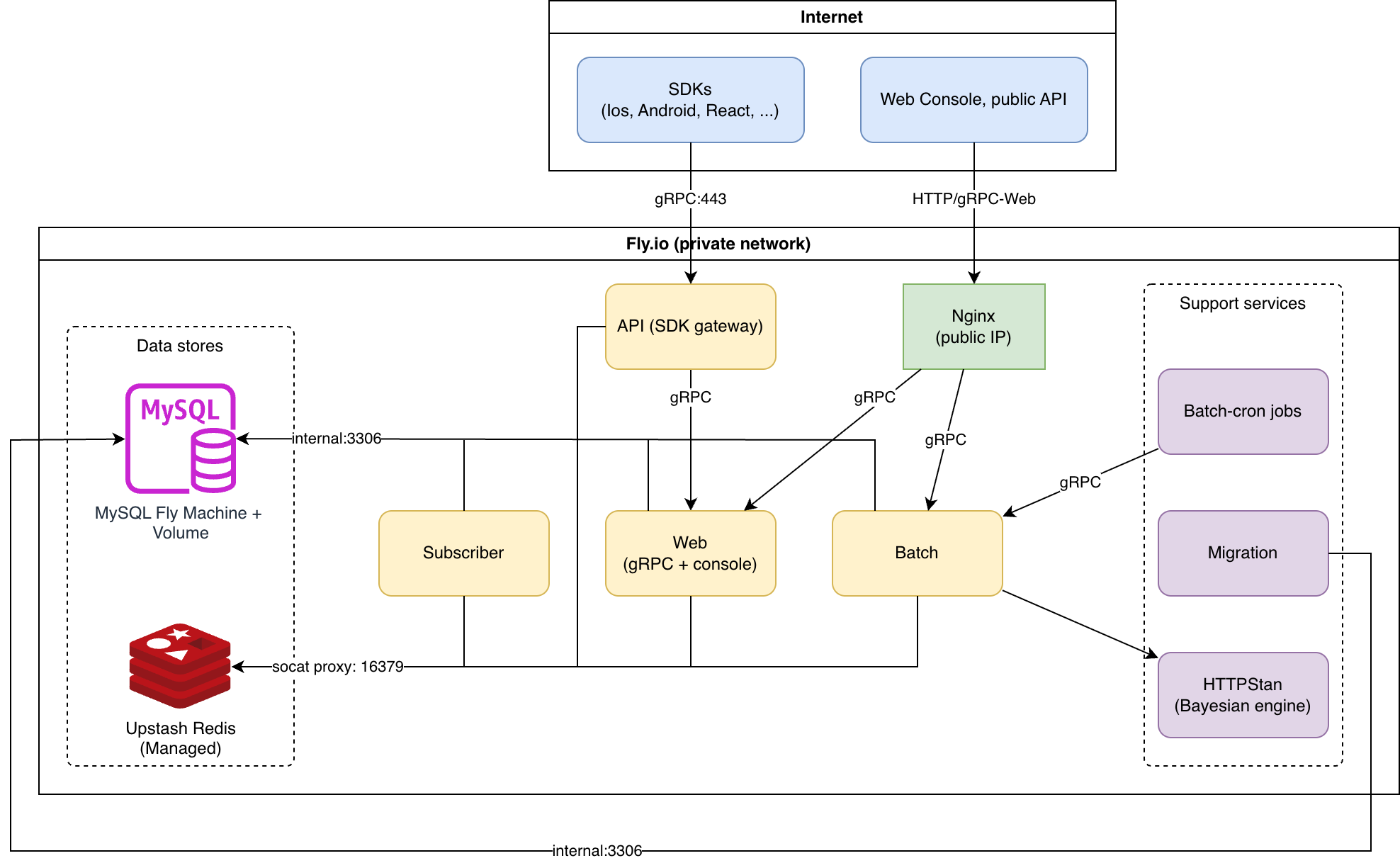
Fly.io ~34 USD/month
| Resource | Spec | Est. cost (USD) |
| MySQL | shared-1x, 1024 MB | ~7 |
| Web | shared-1x, 512 MB | ~5 |
| API | shared-1x, 256 MB | ~3 |
| Batch | shared-1x, 256 MB | ~3 |
| Subscriber | shared-1x, 256 MB | ~3 |
| Nginx | shared-1x, 256 MB | ~3 |
| HTTPStan | shared-1x, 256 MB | ~3 |
| Batch-Cron | shared-1x, 256 MB | ~3 |
| 2x IPv4 (nginx + api) | dedicated | 4 |
| Upstash Redis | Pay-as-you-go | ~0 |
| 1 GB volume | SSD | ~0.15 |
| Total | ~34.15 USD | |
AWS architecture
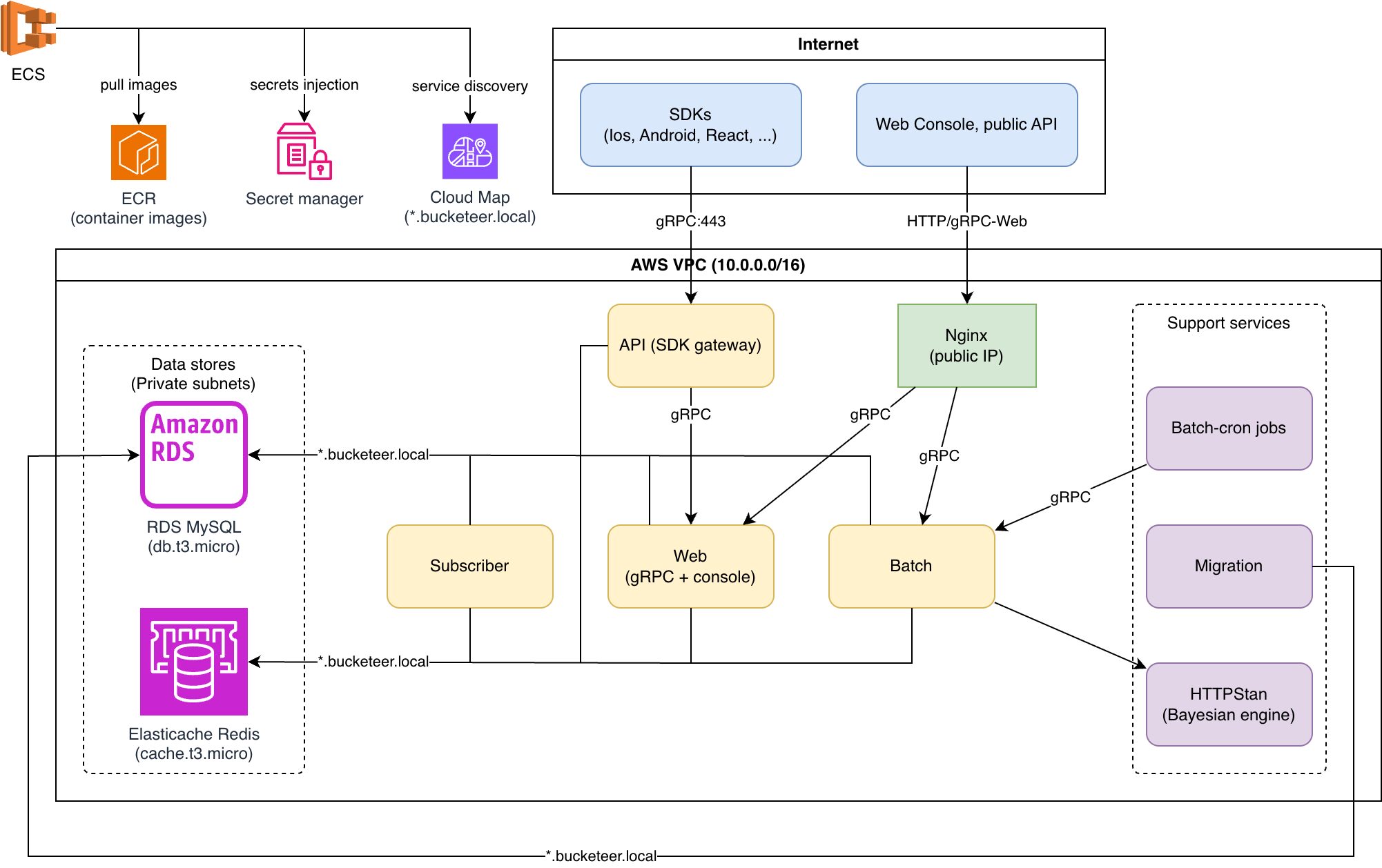
AWS ECS Fargate ~88 USD/month (us-east-1)
| Resource | Spec | Est. cost (USD) |
| ECS Fargate (Nginx) | 0.25 vCPU, 512 MB | ~9 |
| ECS Fargate (API) | 0.25 vCPU, 512 MB | ~9 |
| ECS Fargate (Web) | 0.25 vCPU, 512 MB | ~9 |
| ECS Fargate (Batch) | 0.25 vCPU, 512 MB | ~9 |
| ECS Fargate (Subscriber) | 0.25 vCPU, 512 MB | ~9 |
| WHITE | application | ~16 |
| RDS MySQL | db.t3.micro, 20 GB | ~15 |
| ElastiCache Redis | cache.t3.micro | ~12 |
| NAT Gateway | disabled — ECS tasks use public subnets with `assign_public_ip=true` | 0 |
| Total | ~88 USD | |
AWS Free Tier (first 12 months): RDS and ElastiCache are free (on specific condition, please check the AWS pricing plan website for more detail), bringing cost to ~61 USD/month.
Using feature flags with Bucketeer
If you want to get a feel for the platform before deploying, the Bucketeer demo site lets you try out feature flags, progressive rollouts, and more in a sandbox environment — no infrastructure setup needed, just sign in with a Google account.
Once deployed, you interact with Bucketeer through its web console and SDKs.
Creating a flag is straightforward — give it a name, choose a type (boolean, string, number, or JSON), and set the default value. From there you can configure targeting rules, schedule a rollout, or attach it to an experiment.
Rollouts let you gradually increase the percentage of users who receive a flag variation. You set the initial percentage and the schedule, and Bucketeer advances it automatically.
Experiments split traffic between two or more flag variations and track goal events (clicks, conversions, custom metrics). The platform uses a Bayesian model to determine statistical significance, so you don’t need to set a fixed sample size upfront.
Auto-ops is where things get interesting. You define rules like: “if the error rate for users in the treatment group exceeds 1%, roll back the flag automatically.” This turns your feature flags into a safety layer — progressive delivery with an automatic circuit breaker.
Load Capacity
These are rough estimates based on the compute specs of each deployment option. The API service (SDK flag evaluations) is the main throughput concern — it is called on every request in your application that evaluates a flag.
| Operation | Fly.io (shared-cpu-1x) | AWS (0.25 vCPU Fargate) |
| Flag evaluation – cache hit | ~300–500 RPS | ~200–400 RPS |
| Flag evaluation – cache miss (DB read) | ~100–200 RPS | ~100–200 RPS |
| Event ingestion (Redis Streams writes) | ~200–400 RPS | ~200–400 RPS |
| Management API (web console) | ~50–100 RPS | ~50–100 RPS |
For most teams this is sufficient. SDKs cache evaluation results locally, so the API is not called on every page load — only on SDK initialization and periodic refresh. An application with hundreds of thousands of daily active users typically generates well under 100 RPS of flag evaluations.
Bottlenecks to be aware of:
- MySQL connection pool — both deployments configure 50 open connections. At the default instance size (db.t3.micro on AWS, shared-1x on Fly.io), MySQL saturates around 500–800 simple queries per second.
- Upstash Redis latency — Upstash is a remote managed service (~1–3 ms round trip vs ~0.1 ms for local ElastiCache). This caps throughput on cache-heavy paths compared to the AWS deployment.
- Fly.io shared CPU — shared-cpu-1x is burstable, not a guaranteed allocation. Sustained high traffic may be throttled.
Scaling horizontally is straightforward if you need more capacity. The API service is stateless — on Fly.io it’s fly scale count 2 -a bucketeer-api, and on AWS it’s adjusting the ECS desired count. Each additional instance adds roughly the same throughput.
If your traffic exceeds what the lite deployment can comfortably handle, we recommend either the internal SaaS option (for CyberAgent teams) or the standard Bucketeer deployment on Google Cloud, which is designed for production scale.
What the lite version doesn’t include
Event pipeline – the standard version uses Cloud Pub/Sub, which is fully managed and designed for high-throughput, globally distributed event streaming. The lite version replaces it with Redis Streams, which works well at moderate scale but does not match Pub/Sub’s durability guarantees or its ability to handle much higher event volumes without back pressure. For example if we expect 10000 or even up to millions of events per second, or if we need guaranteed delivery without event loss, cloud Pub/Sub is the better fit.
Data warehouse – every flag evaluation generates an event that is stored and shown in the console as usage statistics. The standard version uses BigQuery for this. The lite version uses MySQL or PostgreSQL — suitable for most teams, but aggregation queries that power the console stats slow down noticeably once the events table reaches hundreds of millions of rows. BigQuery is built for this kind of read and handles billions of rows in seconds. If you need more headroom without leaving the lite deployment, TimescaleDB is also implemented in the lite version — it is a PostgreSQL extension purpose-built for time-series data, and handles large-scale aggregations significantly better than plain PostgreSQL or MySQL through automatic partitioning and compression.
High availability and observability are also not configured out of the box — the lite deployment runs a single instance of each service and logs to stdout. However, each service can be scaled up based on usage requirements.
Getting started
The deployment scripts are available at github.com/bucketeer-io/bucketeeraform. The repository includes a README.md with setup instructions for both Fly.io and AWS. The whole process takes about 10–15 minutes from clone to running web console.
If you’re evaluating Bucketeer or want to run it outside of Google Cloud, this is a reasonable starting point. Contributions and feedback are welcome.
Using Bucketeer inside CyberAgent
If you are a CyberAgent team and prefer not to manage your own infrastructure, we also offer Bucketeer as an internal SaaS. The Bucketeer team hosts and operates the platform within CyberAgent, so you can start using feature flags right away without any setup. Feel free to reach out to us directly.